


Update (October 2026): The article has been updated for the most recent release of the GAMS/cuOpt solver link (v0.0.9 ) for NVIDIA cuOpt 26.10 . Since our last update, GAMS/cuOpt has learned to solve convex QCP and RMIQCP models and MIPs with semi-continuous variables, can run PDLP on several GPUs at once, offers the new primal simplex method and many new options for LP, barrier and MIP, and comes with an installer script. GAMS/cuOpt now requires GAMS 54 or newer.
Update (April 2026): The article has been extended for the most recent release of the GAMS/cuOpt solver link (v0.0.6
) for NVIDIA cuOpt 26.04
which added the pdlp_precision option, and new and updated options for MIP, especially options to fine tune heuristics.
For a long time, GPUs were essential for various AI applications and other high-performance compute applications but had limited impact on mathematical optimization. That’s changing.
The paper “Practical Large-Scale Linear Programming using Primal-Dual Hybrid Gradient ” by Applegate et al. (2021) ignited considerable interest with its primal-dual linear programming (PDLP) implementation, proving the method’s effectiveness on real-world problems. This led many solvers to incorporate GPU-accelerated PDLP implementations into their algorithmic offerings. Public interest has further intensified with the open-sourcing of NVIDIA’s own GPU-accelerated LP/MIP and VRP solver, cuOpt .
At GAMS we’re deeply committed to improving computational efficiency for large-scale linear programming, such as those that occur in energy systems modeling. This commitment is demonstrated through projects like PEREGRINE , which develops and utilizes innovative solver technology such as PIPS-IPM++ , a parallel, high-performance computing (HPC) capable interior point method tailored for block-structured LPs, which often arise naturally in large-scale problems that have repetitive substructures. Our ongoing efforts also include exploring cutting-edge technologies like GPU-accelerated optimization with PDLP, to effectively address the challenges of modern optimization.
We are therefore happy to announce the GAMS/cuOpt Link , developed in collaboration with NVIDIA. This offering allows you to solve GAMS and GAMSPy models using cuOpt and further expands our collection of GPU-accelerated solvers, which already features COPT and HiGHS (both utilizing a GPU-accelerated implementation of PDLP, COPT also has a GPU-accelerated Barrier) as well as Gurobi and Xpress. The latter two also have GPU-accelerated PDHG solvers. COPT remains the only commercial one with a GPU-accelerated barrier.
This blog post focuses on the practical application of GAMS/cuOpt rather than extensive benchmarking. It aims to address:
- What model types does cuOpt support
- What hardware is needed
- How can cuOpt be utilized through GAMS and GAMSPy
What model types does cuOpt support?
NVIDIA cuOpt offers a flexible set of solver methods and features for optimizing Linear Programming (LP), Mixed-Integer Linear Programming (MILP), Quadratic Programming (QP) , and Vehicle Routing Problems (VRP)1. This versatility allows users to tailor its operation to specific problem characteristics and desired solution qualities.
cuOpt offers five LP methods. The default concurrent method runs PDLP (GPU), Barrier (GPU), and Dual Simplex (CPU) simultaneously, returning the faster solution. The GPU-based PDLP method is designed for large-scale memory-intensive LPs and can work on model instances that often run out of memory with the Barrier method. NVIDIA introduced multi-GPU PDLP in cuOpt 26.08 and GAMS/cuOpt v0.0.9 exposes this functionality with cuOpt 26.10. Dual Simplex is a classic CPU-based method suited for small to medium-sized LPs, particularly when a high-quality basic solution is required. cuOpt 26.10 added a Primal Simplex method as a fifth option. Starting with version 26.02, cuOpt comes with the powerful LP presolve PSLP that allows dual preserving presolve for very large LPs.
Previously, cuOpt relied solely on the PaPILO presolver. While effective for medium-sized Mixed-Integer Programming (MIP) problems, PaPILO was not architected for large-scale Linear Programming (LP). Attempting to use it for such tasks often resulted in rapid memory exhaustion and time-outs. Furthermore, PaPILO lacked the ability to postsolve dual solutions for critical steps like aggregation, limiting its overall effectiveness. Recognizing that presolving is vital for performance, cuOpt 26.02 has introduced PSLP hence making it a robust, high-performance solution for optimization pipelines involving exceptionally large-scale linear programs.
For MIP, NVIDIA cuOpt uses a hybrid GPU/CPU method, running primal heuristics on the GPU and improving the dual bound on the CPU.
What hardware is needed?
cuOpt requires an NVIDIA GPU with a Volta architecture or newer for CUDA 12, and a Turing architecture or newer for CUDA 13. Powerful GPUs such as the NVIDIA V100, A100, H100/H200, and the latest Blackwell series B100/B200 (as seen in benchmarks ) can be deployed on-premise but the seamless integration of GAMS/cuOpt into GAMS Engine SaaS makes these capabilities more accessible to those without GPU-accelerated infrastructure. This cloud-based solution provides users with access to the precise hardware needed for their optimization problems, eliminating the need for substantial upfront investment.
How can cuOpt be utilized through GAMS and GAMSPy?
GAMS/cuOpt can be set up to run locally or it can be run on the cloud via GAMS Engine SaaS.
Installing and using cuOpt locally with GAMS and GAMSPy
Before you begin, ensure your system meets the following system requirements:
- Operating System: Linux, Windows 11 through WSL2
- CPU architecture: x86_64, arm64
- GAMS: Version 54 or newer
- GAMSPy: Version 1.12.1 or newer
- NVIDIA GPU: Volta architecture or better with CUDA 12, Turing architecture or better with CUDA 13
- CUDA Runtime Libraries: 12 or 13
- System libraries: OpenSSL 3 and zlib
Installation with the installer script (recommended)
The script fetch-cuoptlink.py
downloads the solver link (and optionally the matching CUDA runtime libraries) from the latest GitHub release
, installs it into your GAMS system directory, adds cuOpt to the gamsconfig.yaml
file there without overwriting your other settings, and verifies the installation by solving a small LP. The script has no dependencies besides Python. For example, to install GAMS/cuOpt into the GAMS system directory of GAMSPy2:
curl -O https://raw.githubusercontent.com/GAMS-dev/cuoptlink-builder/main/fetch-cuoptlink.py
python fetch-cuoptlink.py install -g "$(gamspy show base)" --cuda-runtime
For a standalone GAMS system, pass its directory to -g instead. Run python fetch-cuoptlink.py without arguments for an interactive installation that detects your GAMS system and CUDA version, and python fetch-cuoptlink.py uninstall to remove the solver link again.
Manual installation
-
Download and unpack
cuopt-link-release-cu{12,13}-{arm64,x86_64}.zip(for CUDA 12 or 13 and 64-bit CPU instruction set ARM or x86) from the latest GitHub release : Unpack the contents ofcuopt-link-release-cu*-*.zipinto your GAMS system directory2. The archive contains a filegamsconfig_cuopt.yamlwith a solverConfig section that enables cuOpt for use with GAMS. If your GAMS system directory has nogamsconfig.yamlyet, copygamsconfig_cuopt.yamltogamsconfig.yaml. Otherwise add itssolverConfigentry to your existinggamsconfig.yaml. -
Download and unpack
cu{12,13}-runtime-{arm64,x86_64}.zipfrom the latest GitHub release (recommended): Even if your machine already has CUDA runtime libraries, we recommend to unpackcu*-runtime-*.zipinto the same GAMS system directory in order to provide the precise library versions the link was built against.
Hint: The GAMSPy/cuOpt example notebooks automate these steps and allow you to get started right away.
Running GAMS/cuOpt and GAMSPy/cuOpt locally
After installation, you can run a GAMS or GAMSPY model with cuOpt.
GAMS
To load and solve the trnsport model from the GAMS model library, execute:
gamslib trnsport
gams trnsport lp=cuopt
GAMSPy
To use cuOpt with GAMSPy (e.g. with the transport.py
example), set cuOpt as solver in the solve function and set option gamspy.set_options({"SOLVER_VALIDATION": 0}).
[...]
transport.solve(solver="cuopt")
Running cuOpt in the cloud via GAMS Engine SaaS
An alternative to a local installation is to use cuOpt via GAMS Engine SaaS. This cloud-based platform offers a centralized solution for submitting GAMS jobs. It supports various client applications such as GAMS Studio , GAMS MIRO , the GAMS Engine Web UI , and custom scripts in Python and other languages. This flexibility allows users to integrate cuOpt into existing GAMS and GAMSPy workflows and lowers the barrier to entry by avoiding the need for significant on-premise GPU investments. Users gain access to necessary hardware configurations without substantial upfront capital expenditure, making GPU-accelerated optimization more accessible and scalable.
Not yet a GAMS/Engine SaaS user? Request your free test account at sales@gams.com and let the team know you want to try GAMS/cuOpt.
Running GAMS/cuOpt on Engine SaaS through GAMS Studio
The process of running GAMS/cuOpt on Engine SaaS through GAMS Studio offers a user experience akin to executing GAMS jobs locally within Studio.
Hint: Are you a Windows or Mac user working with GAMS Studio? No Problem. While cuOpt is only available for Linux, you can submit your GAMS/cuOpt jobs from GAMS Studio under Windows and Mac as well.3
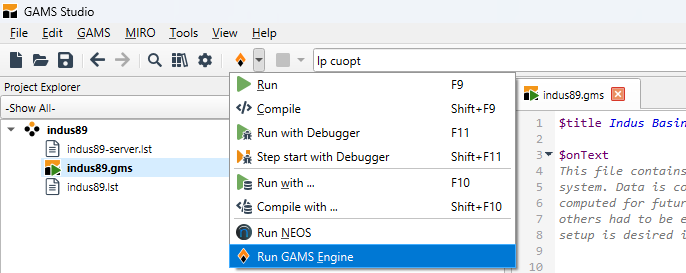
- Select “Run GAMS Engine” Remember to configure cuOpt as your LP solver, either through the command-line parameter (as demonstrated below) or by including an appropriate option statement within your GAMS code.
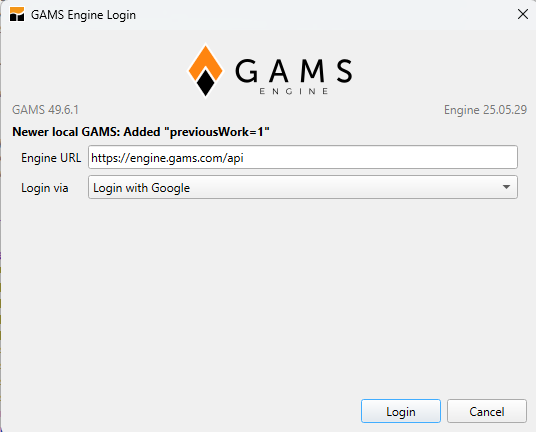
- Should you not already be logged in, the GAMS Engine Login Dialog will appear. Please choose your preferred sign-in method to proceed with logging in.
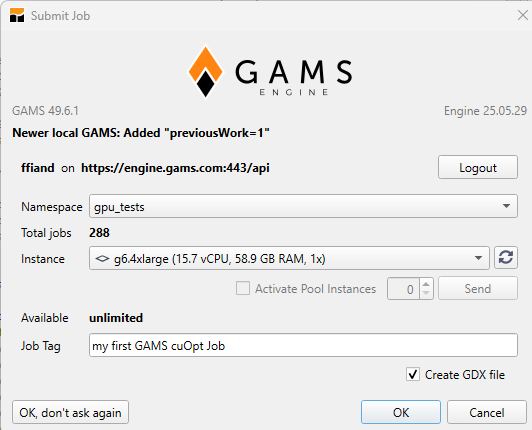
- The Submit Job dialog box will appear. Select the desired Namespace and instance for submission. Optionally, assign a tag to the job before clicking OK.
- Your job compiles locally and is then submitted to Engine SaaS for execution. You can monitor its progress in the Process Log. Upon completion, the results and all output files are downloaded and become accessible on your local system.
--- Job indus89.gms Start 06/23/25 22:07:03 50.1.0 12b75dde WEX-WEI x86 64bit/MS Windows
[...]
--- Starting compilation
--- indus89.gms(3485) 4 Mb
*** Status: Normal completion
--- Job indus89.gms Stop 06/23/25 22:07:03 elapsed 0:00:00.038
 adding: indus89.gms (164 bytes security) (stored 0%)
 adding: indus89.g00 (164 bytes security) (deflated 5%)

--- GAMS Engine at https://engine.gams.com:443/api
--- switch LOG to indus89-server.lst
TOKEN: b88ca408-f993-42ff-afe6-972c2ac1fae0

--- Job queued (80 sec)
--- Job indus89.gms Start 06/23/25 20:10:18 49.6.1 55d34574 LEX-LEG x86 64bit/Linux
--- Applying:
   /home/jail/opt/gams/gmsprmun.txt
   /home/jail/opt/gams/gamsconfig.yaml
--- GAMS Parameters defined
   LP cuopt
   Restart /home/gfreeman/indus89.g0?
   Input /home/gfreeman/indus89.gms
[...]
--- Reset Solvelink = 1
---   2,726 rows  6,570 columns  39,489 non-zeroes
--- Range statistics (absolute non-zero finite values)
--- RHS       [min, max] : [ 8.438E-04, 2.170E+04] - Zero values observed as well
--- Bound     [min, max] : [ 5.000E-04, 2.713E+03] - Zero values observed as well
--- Matrix    [min, max] : [ 4.104E-04, 1.000E+06]
--- Executing CUOPT (Solvelink=1): elapsed 0:00:00.117
GAMS/cuOpt link was built against cuOpt version: 26.02.00, git hash: f73da24defcfc405317c0ae409a965fcaf7f58d9
Setting parameter log_file to /home/gfreeman/225a/cuopt.dat
cuOpt version: 26.2.0, git hash: f73da24d, host arch: x86_64, device archs: 70-real,75-real,80-real,86-real,90a-real,100f-real,120a-real,120
CPU: Intel(R) Xeon(R) Platinum 8481C CPU @ 2.70GHz, threads (physical/logical): 13/26, RAM: 227.96 GiB
CUDA 12.9, device: NVIDIA H100 80GB HBM3 (ID 0), VRAM: 79.11 GiB
CUDA device UUID: 3c527f11-4f7e-0effffff95-5758-ffffff

Solving a problem with 2725 constraints, 6569 variables (0 integers), and 36535 nonzeros
Problem scaling:
Objective coefficents range:          [2e-01, 1e+06]
Constraint matrix coefficients range: [4e-04, 1e+04]
Constraint rhs / bounds range:        [0e+00, 2e+04]
Variable bounds range:                [5e-04, 3e+03]
Warning: input problem contains a large range of coefficients: consider reformulating to avoid numerical difficulties.

Third-party presolve is disabled, skipping
Objective offset -0.000000 scaling_factor -1.000000
Running concurrent

Dual simplex finished in 0.72 seconds, total time 3.62
Barrier finished in 3.95 seconds
   Iter    Primal Obj.      Dual Obj.    Gap        Primal Res.  Dual Res.   Time
      0 -0.00000000e+00 -0.00000000e+00  0.00e+00   4.05e+04     2.50e+07   5.511s
PDLP finished
Concurrent time:  2.609s, total time 5.513s
Solved with dual simplex
Status: Optimal   Objective: 1.14873646e+05  Iterations: 6608  Time: 5.513s
--- Reading solution for model wsisn[LS2:2523]
--- Executing after solve: elapsed 0:01:00.859[LS2:12126]
--- GDX File C:\Users\ffian\Documents\GAMS\Studio\workspace\indus89.gdx
*** Status: Normal completion[LS2:12142]
--- Job indus89.gms Stop 06/23/25 20:11:19 elapsed 0:01:00.869
Archive:  solver-output.zip
 inflating: indus89.lst
 inflating: indus89.lxi
--- extracting: .\indus89-temp\indus89.gms
 inflating: solver.log
 inflating: indus89.gdx
 inflating: indus89.g00
*** Local file updated: indus89.gdx
*** Local file updated: indus89-server.lst
*** Local file updated: indus89-server.lxi
*** Local file updated: indus89-solver.log
Running GAMSPy/cuOpt on Engine SaaS
In order to submit your GAMSPy model to Engine SaaS for solving, you need to define the GAMS Engine configuration by importing EngineClient and creating an instance, which can then be passed to the solve method with the backend specified as ’engine'.
To adapt the GAMSPy model library’s mexss model for use with cuOpt under Engine, some modifications are necessary.
[...]
from gamspy import (
    Container,
    Equation,
    [...],
    EngineClient
)

[...]

#create EngineClient instance. Submit to namespace gpu_tests and select an instance with NVIDIA GPU
client = EngineClient(
    host="https://engine.gams.com/api",
    username=os.environ["ENGINE_USER"],
    password=os.environ["ENGINE_PASSWORD"],
    namespace="gpu_tests",
    engine_options={"labels": "instance=g6.4xlarge"}
)

#solve with solver cuopt and engine backend
mexss.solve(solver="cuopt", backend="engine", client=client, output=sys.stdout)
[...]
The Terminal output will look as follows:
(gamspy) PS C:\Users\ffian> & C:/Users/ffian/.conda/envs/gamspy/python.exe c:/Users/ffian/Documents/projects/gamspy-examples/models/mexss/mexss.py
[ENGINE - INFO] Job status is queued...
[ENGINE - INFO] Job status is queued...
[ENGINE - INFO] Job status is queued...
--- Job __AcZmhoFQyKC4_Jc_7zWpQ.gms Start 06/30/25 11:36:04 49.6.1 55d34574 LEX-LEG x86 64bit/Linux
--- Applying:
   /home/jail/opt/gams/gmsprmun.txt
   /home/jail/opt/gams/gamsconfig.yaml
--- GAMS Parameters defined
   LP cuopt
[...]
--- Generating LP model mexss
--- __AcZmhoFQyKC4_Jc_7zWpQ.gms(459) 4 Mb
--- Reset Solvelink = 1
---   74 rows  78 columns  230 non-zeroes
--- Range statistics (absolute non-zero finite values)
--- RHS       [min, max] : [ 5.600E-01, 4.011E+00] - Zero values observed as well
--- Bound     [min, max] : [        NA,        NA] - Zero values observed as well
--- Matrix    [min, max] : [ 1.200E-01, 1.500E+02]
--- Executing CUOPT (Solvelink=1): elapsed 0:00:00.002
GAMS/cuOpt link was built against cuOpt version: 26.02.00, git hash: f73da24defcfc405317c0ae409a965fcaf7f58d9
Setting parameter log_file to /home/gfreeman/225a/cuopt.dat
cuOpt version: 26.2.0, git hash: f73da24d, host arch: x86_64, device archs: 70-real,75-real,80-real,86-real,90a-real,100f-real,120a-real,120
CPU: Intel(R) Xeon(R) Platinum 8481C CPU @ 2.70GHz, threads (physical/logical): 13/26, RAM: 228.04 GiB
CUDA 12.9, device: NVIDIA H100 80GB HBM3 (ID 0), VRAM: 79.11 GiB
CUDA device UUID: 3c527f11-4f7e-0effffff95-5758-ffffff

Solving a problem with 73 constraints, 77 variables (0 integers), and 225 nonzeros
Problem scaling:
Objective coefficents range:          [1e+00, 1e+00]
Constraint matrix coefficients range: [1e-01, 2e+02]
Constraint rhs / bounds range:        [0e+00, 4e+00]
Variable bounds range:                [0e+00, 0e+00]

Third-party presolve is disabled, skipping
Objective offset 0.000000 scaling_factor 1.000000
Running concurrent

Dual simplex finished in 0.09 seconds, total time 2.81
Barrier finished in 2.95 seconds
   Iter    Primal Obj.      Dual Obj.    Gap        Primal Res.  Dual Res.   Time
      0 +0.00000000e+00 +0.00000000e+00  0.00e+00   4.70e+00     2.00e+00   4.621s
PDLP finished
Concurrent time:  1.901s, total time 4.623s
Solved with dual simplex
Status: Optimal   Objective: 5.38811204e+02  Iterations: 56  Time: 4.623s
--- Reading solution for model mexss
--- Executing after solve: elapsed 0:00:01.397
--- __AcZmhoFQyKC4_Jc_7zWpQ.gms(518) 4 Mb
--- GDX File /home/gfreeman/__AcZmhoFQyKC4_Jc_7zWpQout.gdx
*** Status: Normal completion
--- Job __AcZmhoFQyKC4_Jc_7zWpQ.gms Stop 06/30/25 11:36:06 elapsed 0:00:01.398
[ENGINE - INFO] Results have been extracted to your working directory: C:\Users\ffian\AppData\Local\Temp\tmpizp77f7a.
Key considerations when working with GAMS/cuOpt:
cuOpt offers the prospect of considerable speedup, particularly for large-scale linear programming problems. However, discussions have arisen regarding the accuracy of solutions obtained by leveraging first-order methods like PDLP. In a recent webinar , Gurobi Co-Founder and Chairman Ed Rothberg noted that while PDLP can offer faster solve times, it may struggle to deliver high-precision solutions when compared to interior point methods. Julian Hall expanded on this in the HiGHS Newsletter 25.0 , where he presented experimental comparisons between cuPDLP-C and the HiGHS interior point solver. His findings showed that although PDLP was faster on several instances, some solutions exhibited notable deviations from true optimality.
These observations underscore a critical trade-off: while first-order methods can unlock substantial speedups, especially for very large models, users must weigh this against the level of accuracy required for their use case. Understanding these trade-offs and using solvers and algorithms thoughtfully is essential for making informed decisions when selecting a solver. Carefully comparing GAMS/cuOpt with solvers you’re already using can be a smart move. In the following section, we’ll briefly describe which GAMS model types cuOpt can solve, explore the solver options GAMS/cuOpt offers, and demonstrate how the GAMS tool Examiner can be effectively used to draw conclusions about solution quality.
Supported problem types and limitations
cuOpt can solve the following GAMS problem types:
- LP (Linear Programming)
- MIP (Mixed Integer Programming)
- RMIP (Relaxed Mixed Integer Programming)
- QCP (Quadratically Constrained Programming, convex only)
- RMIQCP (Relaxed Mixed Integer Quadratically Constrained Programming, convex only)
Mixed-integer quadratic models (MIQCP) are not supported, since cuOpt’s MIP solver only handles linear objectives and constraints.
Note on Discrete Variables: The type of discrete variables is limited to binaries, integers and semi-continuous variables. SOS1, SOS2 and semi-integer variables are not supported.
cuOpt parameters
GAMS/cuOpt options can be set through a GAMS solver options file . The various GAMS/cuOpt options are listed here by category (click a category to expand it), with a few words about each to indicate its function.
For a more detailed documentation of the available parameters, consult the official NVIDIA cuOpt user guide .4
General Options
| Option | Description | Type | Default |
|---|---|---|---|
| num_cpu_threads | Number of CPU threads used by the LP and MIP solvers (default: GAMS Threads). | integer | -1 |
| presolve | Presolver used for presolve reductions.
|
enumint | -1 |
| mip_probing | Enables the probing cache in cuOpt’s own MIP presolve. | boolean | 1 |
| time_limit | Time limit in seconds after which the solver stops and returns the current solution (default: GAMS ResLim). | double | 1e10 |
| work_limit | Work limit (a machine-independent measure of solver effort) after which the MIP solver stops and returns the current solution. | double | 1e10 |
| node_limit | Maximum number of branch-and-bound nodes the MIP solver explores before it stops and returns the best feasible solution found (if any). | integer | maxint |
| prob_read | Reads the problem from an MPS file instead of the GAMS model. No solution is reported back to GAMS in this case. | string | |
| solution_file | Name of a file to which cuOpt writes the solution. | string | |
| user_problem_file | Name of a file to which cuOpt writes the problem as it receives it (MPS format). | string | |
| presolve_file | Name of a file to which cuOpt writes the presolved problem. | string | |
| random_seed | Random seed used by the solver (-1: automatic). A fixed seed gives reproducible results in deterministic mode. | integer | -1 |
Linear Programming Options
| Option | Description | Type | Default |
|---|---|---|---|
| num_gpus | Number of GPUs used for LP solves. In the default concurrent mode, up to 2 GPUs are used to run PDLP and barrier on separate GPUs. With method 1 (PDLP), -1 (all visible GPUs) or a value greater than 1 runs multi-GPU PDLP, which distributes the LP across the GPUs (the problem must currently fit into the memory of a single GPU). | integer | 1 |
| multigpu_pdlp_partitioner | How multi-GPU PDLP splits the problem across GPUs.
|
enumint | 0 |
| dual_postsolve | Enables dual postsolve when Papilo presolve is used for LPs. | boolean | 1 |
| pdlp_solver_mode | Parameter preset for PDLP.
|
enumint | 4 |
| method | Algorithm used to solve LPs.
|
enumint | 0 |
| pdlp_precision | Floating-point precision used by PDLP.
|
enumint | -1 |
| iteration_limit | Iteration limit after which the solver stops and returns the current solution (default: GAMS IterLim). | integer | maxint |
| infeasibility_detection | Enables infeasibility detection in PDLP. | boolean | 0 |
| strict_infeasibility | Enables strict infeasibility mode in PDLP. | boolean | 0 |
| crossover | Enables crossover from the PDLP solution to a basic solution. | boolean | 0 |
| large_nnz_threshold | Number of nonzeros (after presolve) at or above which concurrent mode skips barrier and dual simplex and PDLP uses column reduction where supported (-1: disables both). | integer | 50000000 |
| primal_simplex_pricing | Pricing rule of the primal simplex method.
|
enumint | 1 |
| dual_simplex_initial_perturbation | Whether the simplex method perturbs the problem initially (-1: automatic, 0: off, 1: on). | integer | -1 |
| dual_simplex_remove_perturbation | Whether the simplex method removes the perturbation again (-1: automatic, 0: off, 1: on). | integer | -1 |
| pdlp_hyper_enable_curtis_reid_scaling | Enables Curtis-Reid scaling in PDLP before Ruiz and Pock-Chambolle scaling. | boolean | 1 |
| pdlp_hyper_reduced_matrix | PDLP column reduction, which iterates on a reduced matrix and periodically refreshes with the full problem (-1: automatic, i.e. at or above large_nnz_threshold, 0: off, 1: on). | integer | -1 |
| pdlp_hyper_project_initial_primal | Whether PDLP projects the initial primal solution (the GAMS levels) onto the variable bounds (-1: as set by pdlp_solver_mode, 0: off, 1: on). | integer | -1 |
| save_best_primal_so_far | Makes PDLP keep the best primal solution found so far. | boolean | 0 |
| first_primal_feasible | Makes PDLP stop at the first primal feasible solution. | boolean | 0 |
| per_constraint_residual | Makes PDLP compute primal and dual residuals per constraint instead of globally. | boolean | 0 |
| absolute_primal_tolerance | Absolute primal tolerance of PDLP’s primal feasibility check. | double | 0.0001 |
| relative_primal_tolerance | Relative primal tolerance of PDLP’s primal feasibility check. | double | 0.0001 |
| absolute_dual_tolerance | Absolute dual tolerance of PDLP’s dual feasibility check. | double | 0.0001 |
| relative_dual_tolerance | Relative dual tolerance of PDLP’s dual feasibility check. | double | 0.0001 |
| absolute_gap_tolerance | Absolute tolerance of PDLP’s duality gap check. | double | 0.0001 |
| relative_gap_tolerance | Relative tolerance of PDLP’s duality gap check. | double | 0.0001 |
Barrier Solver Options
| Option | Description | Type | Default |
|---|---|---|---|
| folding | Whether to fold the LP. Folding can reduce the problem size by exploiting symmetry.
|
enumint | -1 |
| dualize | Whether to dualize the LP in presolve. Dualizing can speed up problems with inequality constraints that have more constraints than variables.
|
enumint | -1 |
| ordering | Ordering algorithm used by cuDSS for sparse factorizations. The ordering can have a large impact on run time.
|
enumint | -1 |
| augmented | Linear system solved in each barrier iteration.
|
enumint | -1 |
| eliminate_dense_columns | Eliminates dense columns from the constraint matrix. This can reduce fill-in during factorization, but needs extra solves in each iteration. | boolean | 1 |
| cudss_deterministic | Runs cuDSS in deterministic mode, which gives reproducible results but may be slower. | boolean | 0 |
| barrier_dual_initial_point | Method used to compute the dual initial point of the barrier method. The initial point affects the number of barrier iterations.
|
enumint | -1 |
| barrier_iterative_refinement | Applies iterative refinement after each barrier iteration to improve accuracy. | boolean | 1 |
| qcqp_hyper_ruiz_equilibration | Ruiz equilibration when scaling QCQPs for barrier (-1: automatic, 0: off, 1: on). | integer | -1 |
| barrier_adaptive_regularization | Adaptive regularization in the barrier method (-1: automatic, 0: off, 1: on). | integer | -1 |
| barrier_primal_regularization | Initial primal regularization of the augmented system (-1: automatic). | double | -1 |
| barrier_dual_regularization | Initial dual regularization of the augmented system (-1: automatic). | double | -1 |
| barrier_initial_point_safeguard | Margin by which the barrier initial point is pushed into the interior of the nonnegative orthant or second-order cone. | double | 10 |
| barrier_presolve_bound_free_variables | Whether barrier presolve adds bounds to free variables (-1: automatic, 0: off, 1: on). | integer | -1 |
| barrier_hyper_gpu_ruiz_nnz_threshold | Number of nonzeros (in A and Q) at or above which barrier runs Ruiz equilibration on the GPU instead of the CPU. | integer | 500000 |
| barrier_step_scale | Scaling factor applied to the barrier step size. | double | 0.9 |
| postsolve_info | Makes barrier log extra diagnostics after the solve, such as unscaled residual checks and postsolve messages (-1: automatic, currently off, 0: off, 1: on). | integer | -1 |
Mixed Integer Linear Programming Options
| Option | Description | Type | Default |
|---|---|---|---|
| miptrace | Name of a MIP trace file that logs the incumbent and best bound over time. | string | |
| mipstart | Tries to use the initial variable levels as an initial MIP solution. | boolean | 0 |
| mip_heuristics_only | Runs only the GPU heuristics. | boolean | 0 |
| mip_scaling | Scaling applied to the MIP problem.
|
enumint | 2 |
| mip_symmetry | Symmetry detection and handling in the MIP solver.
|
enumint | -1 |
| mip_absolute_tolerance | MIP absolute tolerance. | double | 1e-06 |
| mip_relative_tolerance | MIP relative tolerance. | double | 1e-12 |
| mip_integrality_tolerance | MIP integrality tolerance. | double | 1e-05 |
| mip_absolute_gap | Absolute gap at which the MIP solve terminates (default: GAMS OptCA). | double | 1e-10 |
| mip_relative_gap | Relative gap at which the MIP solve terminates (default: GAMS OptCR, at most 0.1). | double | 1e-4 |
| mip_cut_passes | Number of cut passes (0: no cuts). | integer | 10 |
| mip_mixed_integer_rounding_cuts | Mixed integer rounding cuts (-1: automatic, 0: off, 1: on). | integer | -1 |
| mip_mixed_integer_gomory_cuts | Mixed integer Gomory cuts (-1: automatic, 0: off, 1: on). | integer | -1 |
| mip_strong_chvatal_gomory_cuts | Strong Chvátal-Gomory cuts (-1: automatic, 0: off, 1: on). | integer | -1 |
| mip_knapsack_cuts | Knapsack cuts (-1: automatic, 0: off, 1: on). | integer | -1 |
| mip_flow_cover_cuts | Flow cover cuts.
|
enumint | -1 |
| mip_implied_bound_cuts | Implied bound cuts (-1: automatic, 0: off, 1: on). | integer | -1 |
| mip_clique_cuts | Clique cuts (-1: automatic, 0: off, 1: on). | integer | -1 |
| mip_zero_half_cuts | Zero-half cuts (-1: automatic, 0: off, 1: on). | integer | -1 |
| mip_rins | (Recursive) RINS heuristic (relaxation induced neighborhood search) (-1: automatic, 0: off, 1: on). | integer | -1 |
| mip_rens | RENS heuristic (relaxation enforced neighborhood search) (-1: automatic, 0: off, 1: on). | integer | -1 |
| mip_mutation | Mutation heuristic, which fixes a random subset of the integer variables to their incumbent values (-1: automatic, 0: off, 1: on). | integer | -1 |
| mip_determinism_mode | Whether the MIP solver runs in opportunistic or deterministic mode.
|
enumint | 0 |
| mip_batch_pdlp_strong_branching | Use of batched PDLP for strong branching at the root.
|
enumint | 0 |
| mip_batch_pdlp_reliability_branching | Use of batched PDLP for reliability branching.
|
enumint | 0 |
| mip_objective_step | Detects and exploits a discrete step structure in the objective to tighten the dual bound. | boolean | 1 |
| mip_cut_change_threshold | Minimum dual bound improvement per cut pass (-1: no threshold). | double | -1 |
| mip_cut_min_orthogonality | Minimum orthogonality a cut needs to be added to the LP relaxation. | double | 0.5 |
| mip_reduced_cost_strengthening | Reduced cost strengthening (-1: automatic, 0: off, 1: root only, 2: root and branching). | integer | -1 |
| mip_dual_degenerate_feasibility_pump | Dual degenerate feasibility pump (-1: automatic, currently off, 0: off, 1: on). | integer | -1 |
| mip_primal_degenerate_pivots | Primal degenerate pivots to improve reduced costs (-1: automatic, currently on, 0: off, 1: on). | integer | -1 |
| mip_dual_degenerate_pivots | Dual degenerate pivots to remove fractional integer variables (-1: automatic, currently off, 0: off, 1: root and dives, 2: everywhere). | integer | -1 |
| mip_reliability_branching | Reliability branching mode. | integer | -1 |
| mip_strong_branching_simplex_iteration_limit | Simplex iteration limit for strong branching. | integer | -1 |
| mip_hyper_heuristic_population_size | Maximum number of solutions in the heuristics’ solution pool. | integer | 32 |
| mip_hyper_heuristic_num_cpufj_threads | Number of parallel CPU feasibility jump climbers. | integer | 8 |
| mip_hyper_heuristic_root_lp_time_ratio | Fraction of the total time spent on the root LP. | double | 0.1 |
| mip_hyper_heuristic_root_lp_max_time | Maximum time in seconds spent on the root LP. | double | 15 |
| mip_hyper_heuristic_rins_time_limit | Time limit in seconds per RINS sub-MIP. | double | 3 |
| mip_hyper_heuristic_rins_max_time_limit | Upper limit in seconds of the adaptive RINS time budget. | double | 20 |
| mip_hyper_heuristic_rins_fix_rate | Fraction of variables fixed by RINS. | double | 0.5 |
| mip_hyper_heuristic_stagnation_trigger | Feasibility pump loops without improvement before recombination starts. | integer | 3 |
| mip_hyper_heuristic_max_iterations_without_improvement | Depth of the diversification step after stagnation. | integer | 8 |
| mip_hyper_heuristic_initial_infeasibility_weight | Initial penalty weight for constraint violations. | double | 1000 |
| mip_hyper_heuristic_n_of_minimums_for_exit | Number of local minima after which feasibility jump exits. | integer | 7000 |
| mip_hyper_heuristic_enabled_recombiners | Bitmask of enabled recombiners (1: bound propagation, 2: feasibility pump, 4: line segment, 8: sub-MIP). | integer | 15 |
| mip_hyper_heuristic_cycle_detection_length | Length of the buffer used to detect cycles in the feasibility pump. | integer | 30 |
| mip_hyper_heuristic_relaxed_lp_time_limit | Base time limit in seconds for relaxed LPs solved by the heuristics. | double | 1 |
| mip_hyper_heuristic_related_vars_time_limit | Time limit in seconds for detecting related variables. | double | 2 |
| mip_hyper_diving_line_search | Line search diving (-1: automatic, 0: off, 1: on). | integer | -1 |
| mip_hyper_diving_pseudocost | Pseudocost diving (-1: automatic, 0: off, 1: on). | integer | -1 |
| mip_hyper_diving_guided | Guided diving (-1: automatic, 0: off, 1: on). | integer | -1 |
| mip_hyper_diving_coefficient | Coefficient diving (-1: automatic, 0: off, 1: on). | integer | -1 |
| mip_hyper_diving_farkas | Farkas diving (-1: automatic, 0: off, 1: on). | integer | -1 |
| mip_hyper_diving_vector_length | Vector length diving (-1: automatic, 0: off, 1: on). | integer | -1 |
| mip_hyper_diving_node_limit | Maximum number of nodes per dive. | integer | 500 |
| mip_hyper_diving_iteration_limit_factor | Simplex iterations allowed per dive, as a fraction of the best-first search iterations. | double | 0.05 |
| mip_hyper_diving_backtrack_limit | Maximum number of backtracks per dive. | integer | 5 |
| mip_hyper_submip_base_target_fixrate | Base target fix rate of the RINS neighborhood. | double | 0.6 |
| mip_hyper_submip_min_fixrate | Minimum fix rate needed to accept a RINS neighborhood. | double | 0.25 |
| mip_hyper_submip_min_fixrate_cap | Upper limit for the minimum fix rate needed to solve a sub-MIP. | double | 0.1 |
| mip_hyper_submip_target_mip_gap | Target MIP gap of a sub-MIP. | double | 0.01 |
| mip_hyper_submip_max_level | Maximum sub-MIP recursion depth. | integer | 10 |
| mip_hyper_submip_iteration_limit_ratio | Simplex iteration limit of a sub-MIP, as a fraction of the parent branch-and-bound iterations. | double | 0.8 |
| mip_hyper_submip_enable_cpufj | Runs CPU feasibility jump on the sub-MIP. | boolean | 1 |
| mip_hyper_submip_node_limit_offset | Base node limit of a sub-MIP. | integer | 200 |
| mip_hyper_submip_iteration_limit_offset | Base simplex iteration limit of a sub-MIP in the root heuristics. | integer | 10000 |
| mip_hyper_submip_round_close_ratio | Share of still-unfixed integer variables left for later neighborhood rounds (0: reach the target fix rate in one round). | double | 0.8 |
| mip_hyper_block_bve | Eliminates blocks of binary variables in cuOpt’s MIP presolve (requires mip_probing). | boolean | 1 |
| mip_hyper_presolve_indicator_strengthening | Adds implied indicator rows and lifts capacity rows by their indicator before Papilo presolve. | boolean | 1 |
| mip_hyper_heuristic_presolve_max_rounds | Maximum number of Papilo presolve rounds in the heuristics (-1: derived from the problem, 0: PaPILO default). | integer | -1 |
| mip_hyper_heuristic_papilo_probing_max_badgesize | Upper limit for Papilo’s probing badge size in MIP presolve (-1: derived from the problem, 0: no limit). | integer | -1 |
| mip_hyper_diving_show_type | Shows in the log which diving heuristic found a new incumbent. | boolean | 0 |
| mip_semi_continuous_big_m | Big-M coefficient used to linearize semi-continuous variables. | double | 1e10 |
Multi-GPU PDLP
With GAMS/cuOpt v0.0.9 and cuOpt 26.10 or newer, LPs can be solved with PDLP on several GPUs at once. This requires both method 1 (PDLP) and num_gpus -1 (all visible GPUs) or num_gpus greater than 1 in the GAMS/cuOpt option file:
method 1
num_gpus -1
Without method 1, i.e. in the default concurrent mode, num_gpus 2 instead runs PDLP and barrier in parallel on two GPUs. The option multigpu_pdlp_partitioner selects how the problem is split across the GPUs, and the GPUs used can be restricted with the environment variable CUDA_VISIBLE_DEVICES. Currently, the whole problem still has to fit into the memory of a single GPU, starting values (levels and marginals) are not passed to multi-GPU PDLP, and convergence can differ from single-GPU PDLP.
Solution quality
No single algorithm is universally optimal for all problem types. Within cuOpt, PDLP is well suited for large-scale, memory-intensive problems due to its ability to avoid explicit matrix factorizations. In contrast, Dual Simplex is better suited for smaller to medium-sized problems, where it can provide high-quality basic solutions.
Users can customize operations based on specific problem characteristics and desired solution qualities, thanks to a wide array of available options. GAMS/Examiner further aids users by providing an unbiased assessment of solution quality, verifying the validity of a solver’s reported optimal solution by checking for primal feasibility, dual feasibility, and optimality.
GAMS/Examiner is used “like a solver” and can be parameterized to use any solver available with GAMS and GAMSPy as a subsolver.
Running Examiner with cuOpt as subsolver
The Examiner options subsolver and subsolveropt allow to specify a subsolver and activate its corresponding option file. For the Examiner example we utilize cuOpt options method 1 and crossover 0.
The following code snippets illustrate one way to set these solver options in both GAMS and GAMSPy.
GAMS
[...]
* Write GAMS/Examiner option file examiner.opt and instruct to use cuOpt as subsolver with a GAMS/cuOpt option file*
file     opt_examiner / examiner.opt /;
putclose opt_examiner 'subsolver cuopt' /
                      'subsolveropt 1'  ;

* Write GAMS/cuOpt option file cuopt.opt and instruct to use*
* PDLP without crossover*
file opt_cuopt / cuopt.opt /;
putclose opt_cuopt 'method 1'    /
                   'crossover 0' ;

option solver =examiner, optFile=1;
solve myModel maximizing myObjective using lp;
[...]
GAMSPy
[...]
#Write cuOpt option file in the container's working directory
myContainer.writeSolverOptions("cuopt", {"method": 1, "crossover": 0})

#set examiner as solver and define examiner options
myModel.solve(solver="examiner", solver_options={"subsolver": "cuopt", "subsolveropt": "1"})
[...]
When solving the indus89 model from the GAMS model library using Examiner and cuOpt, Examiner analyzes the solver’s solution and generates the following report. Note that we asked cuOpt to solve this problem with the default tolerance settings of 1e-4, which are likely to generate constraint violations due to the accuracy level resulting from this tolerance value. To reduce or completely eliminate these violations, we will also discuss additional steps and features provided by cuOpt below.
[...]
Status: Optimal   Objective: 1.15093789e+05  Iterations: 673080  Time: 42.146s
Subsolver cuopt returns modstat 1, solstat 1.


SolvPoint - solver-provided levels & marginals:
Scale range (observed but not applied): [1,999999]
Maximum element: row=objn, col=artwater(nwfp,fresh,jan): Aij = 999999
Primal variable bounds satisfied (tol = 1e-06)
Dual variable bounds satisfied (tol = 1e-06)
Primal infeasible w.r.t. constraints (tol = 1e-06):
  Max violation: watalcz.l(srws,saline,sep): 0 <= 1.70757 <= 0
  2-Norm of violation: 5.54794
Dual constraints satisfied (tol = 1e-06)
Primal CS is nonzero (tol = 1e-07):
  Max violation: canaldiv.l(44-ful,apr): 0.1021 <= 0.106234 <= 0.894
                 canaldiv.m(44-ful,apr): -INF <= 2.561 <= +INF
Dual CS is nonzero (tol = 1e-07):
  Max violation: watalcz.m(srws,saline,sep): -INF <= 0.00933685 <= +INF
                 watalcz.l(srws,saline,sep): 0 <= 1.70757 <= 0
Model attributes OK (tol = 1e-06)
As expected, the returned primal solution reveals significant constraint violations (max violation 1.70757 and 2-Norm of violations 5.54794). If this is unacceptable, mitigation strategies could for example be to reduce the relative primal tolerance by setting GAMS/cuOpt option ‘relative_primal_tolerance 1e-6’ (default 1e-4) or to enable crossover by setting GAMS/cuOpt option ‘crossover 1’.
With relative_primal_tolerance 1e-6 Examiner returns
[...]
Status: Optimal   Objective: 1.14889661e+05  Iterations: 898280  Time: 61.183s
Subsolver cuopt returns modstat 1, solstat 1.


SolvPoint - solver-provided levels & marginals:
Scale range (observed but not applied): [1,999999]
Maximum element: row=objn, col=artwater(nwfp,fresh,jan): Aij = 999999
Primal variable bounds satisfied (tol = 1e-06)
Dual variable bounds satisfied (tol = 1e-06)
Primal infeasible w.r.t. constraints (tol = 1e-06):
  Max violation: demnat.l(prw,buff-milk): 0 <= -0.057 <= 1e+299
  2-Norm of violation: 0.0958988
Dual constraints satisfied (tol = 1e-06)
Primal CS is nonzero (tol = 1e-07):
  Max violation: x.l(psw,saline,sc-mill,bullock,standard,standard): 0 <= 216.779 <= +INF
                 x.m(psw,saline,sc-mill,bullock,standard,standard): -INF <= -0.158928 <= 0
Dual CS is nonzero (tol = 1e-07):
  Max violation: demnat.m(prw,basmati): -INF <= -2.4166 <= 0
                 demnat.l(prw,basmati): 0 <= 0.0619937 <= +INF
Model attributes OK (tol = 1e-06)
As expected, we can observe that a tighter tolerance results in a smaller violation but also in a higher run time.
With ‘crossover 1’ all violations are gone and Examiner returns
[...]
Crossover time 0.36 seconds
Total time 42.69 seconds
Crossover status Optimal
Subsolver cuopt returns modstat 1, solstat 1.


SolvPoint - solver-provided levels & marginals:
Scale range (observed but not applied): [1,999999]
Maximum element: row=objn, col=artwater(nwfp,fresh,jan): Aij = 999999
Primal variable bounds satisfied (tol = 1e-06)
Dual variable bounds satisfied (tol = 1e-06)
Primal constraints satisfied (tol = 1e-06)
Dual constraints satisfied (tol = 1e-06)
Primal CS is zero (tol = 1e-07)
Dual CS is zero (tol = 1e-07)
Model attributes OK (tol = 1e-06)
Note: All experiments were conducted on an AWS EC g6.4xlarge instance, featuring an NVIDIA L4 Tensor Core GPU (even though this is not officially supported). Other instances supporting NVIDIA GPUs V100, A100, H100, and H200 are available upon request. This post aims to guide users on leveraging GAMS/cuOpt for their own experiments, rather than offering an exhaustive performance benchmark.
Conclusion
The new GAMS/cuOpt link empowers users to integrate cuOpt directly into their existing GAMS and GAMSPy models. Whether through local installation or the scalable GAMS Engine SaaS cloud solution, users can leverage cutting-edge GPU performance without the burden of major on-premise GPU investments.
Crucially, GAMS’ robust diagnostic tools—such as Examiner—are integral to this process, providing essential checks on solution feasibility and quality. This ensures that the benefits of GPU acceleration are complemented by the precision required for practical applications.
We invite you to explore the potential of cuOpt with GAMS and GAMSPy for your most challenging optimization tasks. To get started with cuOpt (or any other solver) please contact sales@gams.com .
Your feedback and experiences are vital as we continue advancing large-scale decision-making. Please reach out to support@gams.com or join forum.gams.com with any questions, issues, or success stories you’d like to share.
-
The cuOpt VRP Solver is not available through GAMS and GAMSPy ↩︎
-
Run
gamspy show baseto identify the GAMS system directory for GAMSPy. ↩︎ ↩︎ -
For GAMS versions prior to 51.2.0, please add a “dummy” solverConfig section to the gamsconfig.yaml file:
↩︎[...] solverConfig: - cuopt: minVersion: 49 scriptName: dummy executableName: dummy modelTypes: - LP - MIP - RMIP -
Note that GAMS/cuOpt options omit the “CUOPT_” prefix from the original parameter name. For example, “CUOPT_METHOD” in cuOpt documentation becomes simply ‘method’ in a GAMS/cuOpt solver options file. ↩︎